 Olympe SDK
new Canvas( [dimension])
Creates a Canvas with the specified dimension.
Parameters:
| Name | Type | Argument | Description |
|---|---|---|---|
dimension |
olympe.df.PVector2 |
<optional> |
The dimension (w, h). |
Extends
Methods
-
addColorStop(x, color)
-
Adds a new color stop, defined by an offset and a color, to a given canvas gradient. If no gradient was created, then this method does nothing.
Parameters:
Name Type Description xolympe.df.PONumber | number A value between 0.0 and 1.0 that represents the position between start and end in a gradient.
colorstring A color value to display at the stop position.
Returns:
This
Canvas.- Type
- olympe.ui.std.Canvas
-
arc(x, y, radius, startAngle, endAngle [, anticlockwise])
-
Creates a circular arc centered at '(x, y)' with a radius of 'radius'. The path starts at 'startAngle' and ends at 'endAngle', and travels in the direction given by 'anticlockwise' (defaulting to clockwise).
Parameters:
Name Type Argument Default Description xolympe.df.PONumber | number The x-axis (horizontal) coordinate of the arc's center.
yolympe.df.PONumber | number The y-axis (vertical) coordinate of the arc's center.
radiusolympe.df.PONumber | number The arc's radius. Must be non-negative.
startAngleolympe.df.PONumber | number The angle at which the arc starts, measured clockwise from the positive x-axis and expressed in radians.
endAngleolympe.df.PONumber | number The angle at which the arc ends, measured clockwise from the positive x-axis and expressed in radians.
anticlockwiseolympe.df.PONumber | number <optional>
false trueto have the arc drawn counter-clockwise between the start and end angles.Returns:
This
Canvas- Type
- olympe.ui.std.Canvas
-
arcTo(x1, y1, x2, y2, radius)
-
Adds a circular arc to the current sub-path, using the given control points and radius. The arc is automatically connected to the path's latest point with a straight line, if necessary for the specified parameters.
Parameters:
Name Type Description x1olympe.df.PONumber | number The x-axis coordinate of the first control point.
y1olympe.df.PONumber | number The y-axis coordinate of the first control point.
x2olympe.df.PONumber | number The x-axis coordinate of the second control point.
y2olympe.df.PONumber | number The y-axis coordinate of the second control point.
radiusolympe.df.PONumber | number The arc's radius. Must be non-negative.
Returns:
This
Canvas.- Type
- olympe.ui.std.Canvas
-
beginPath()
-
Starts a new path by emptying the list of sub-paths. Call this method when you want to create a new path.
Returns:
This
Canvas.- Type
- olympe.ui.std.Canvas
-
bezierCurveTo(cp1x, cp1y, cp2x, cp2y, x, y)
-
Adds a cubic Bézier curve to the current sub-path. It requires three points: the first two are control points and the third one is the end point. The starting point is the latest point in the current path, which can be changed using moveTo() before creating the Bézier curve.
Parameters:
Name Type Description cp1xolympe.df.PONumber | number The x-axis coordinate of the first control point.
cp1yolympe.df.PONumber | number The y-axis coordinate of the first control point.
cp2xolympe.df.PONumber | number The x-axis coordinate of the second control point.
cp2yolympe.df.PONumber | number The y-axis coordinate of the second control point.
xolympe.df.PONumber | number The x-axis coordinate of the end point.
yolympe.df.PONumber | number The y-axis coordinate of the end point.
Returns:
This
Canvas.- Type
- olympe.ui.std.Canvas
-
clearRect(x, y, w, h)
-
Erases the pixels in a rectangular area by setting them to transparent black.
Parameters:
Name Type Description xolympe.df.PONumber | number The x-axis coordinate of the rectangle's starting point.
yolympe.df.PONumber | number The y-axis coordinate of the rectangle's starting point.
wolympe.df.PONumber | number The rectangle's width. Positive values are to the right, and negative to the left.
holympe.df.PONumber | number The rectangle's height. Positive values are down, and negative are up.
Returns:
This
Canvas.- Type
- olympe.ui.std.Canvas
-
clip()
-
Turns the current or given path into the current clipping region. It replaces any previous clipping region.
Returns:
This
Canvas.- Type
- olympe.ui.std.Canvas
-
closePath()
-
Attempts to add a straight line from the current point to the start of the current sub-path. If the shape has already been closed or has only one point, this function does nothing.
Returns:
This
Canvas.- Type
- olympe.ui.std.Canvas
-
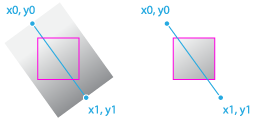
createLinearGradient(x0, y0, x1, y1)
-
Creates a gradient along the line connecting two given coordinates.
Parameters:
Name Type Description x0olympe.df.PONumber | number The x-coordinate of the start point of the gradient
y0olympe.df.PONumber | number The y-coordinate of the start point of the gradient
x1olympe.df.PONumber | number The x-coordinate of the end point of the gradient
y1olympe.df.PONumber | number The y-coordinate of the end point of the gradient
Returns:
This
Canvas.- Type
- olympe.ui.std.Canvas
-
fill()
-
Fills the current or given path with the current fillStyle.
Returns:
This
Canvas.- Type
- olympe.ui.std.Canvas
-
fillRect(x, y, w, h)
-
Draws a rectangle that is filled according to the current fillStyle.
Parameters:
Name Type Description xolympe.df.PONumber | number The x-axis coordinate of the rectangle's starting point.
yolympe.df.PONumber | number The y-axis coordinate of the rectangle's starting point.
wolympe.df.PONumber | number The rectangle's width. Positive values are to the right, and negative to the left.
holympe.df.PONumber | number The rectangle's height. Positive values are down, and negative are up.
Returns:
This
Canvas.- Type
- olympe.ui.std.Canvas
-
fillStyleWithCurrentGradient()
-
Uses the currently defined gradient as the fill style. If no gradient was created, then this method does nothing.
Returns:
This
Canvas.- Type
- olympe.ui.std.Canvas
-
fillText(text, x, y [, maxWidth])
-
draws a text string at the specified coordinates, filling the string's characters with the current fillStyle. An optional parameter allows specifying a maximum width for the rendered text, which the user agent will achieve by condensing the text or by using a lower font size.
This method draws directly to the canvas without modifying the current path, so any subsequent
fill()orstroke()calls will have no effect on it.The text is rendered using the font and text layout configuration as defined by the
font,textAlign,textBaseline, anddirectionproperties.Parameters:
Name Type Argument Default Description textolympe.df.POString | string The text string to render into the context.
xolympe.df.PONumber | number The x-axis coordinate of the point at which to begin drawing the text, in pixels.
yolympe.df.PONumber | number The y-axis coordinate of the point at which to begin drawing the text, in pixels.
maxWidtholympe.df.PONumber | number <optional>
no-limit The maximum number of pixels wide the text may be once rendered.
Returns:
This
Canvas.- Type
- olympe.ui.std.Canvas
-
getFocus()
-
Checks whether this
Elementhas the focus.Warning: Focus may not be applicable on some elements, depending on the platform.
- Inherited From:
- Overrides:
Returns:
trueif Element has focus.- Type
- olympe.df.POBoolean
-
<protected> getGestureEvent()
-
Gets the gesture event manager attached to this element
- Inherited From:
- Overrides:
Returns:
-
getHeight()
-
Gets the height of this element.
- Inherited From:
- Overrides:
- See:
Returns:
the height of this element.
- Type
- olympe.df.PONumber
-
getHTMLElement()
-
Return the DOM HTMLElement if exists (may be null)
- Inherited From:
- Overrides:
Returns:
- Type
- Element
-
<protected> getMouseEvent()
-
Gets the mouse event manager attached to this element.
- Inherited From:
- Overrides:
Returns:
the mouse event manager.
-
getParent()
-
Gets the parent, or container, of this element.
- Inherited From:
- Overrides:
Returns:
the parent of this element.
-
getPosition()
-
Gets the position (x,y) for this element.
- Inherited From:
- Overrides:
Returns:
Position of this element.
- Type
- olympe.df.PVector2
-
<package> getUIProxyCanvas()
-
Returns:
Proxified UI object canvas
- Type
- olympe.uiapi.std.Canvas
-
getUIProxyDockableElement()
-
Note: needs to be public because it is called by RootElement !
- Inherited From:
- Overrides:
Returns:
The proxy element from the UI thread
- Type
- olympe.uiapi.std.DockableElement
-
<protected> getUIProxyElement()
-
Returns the native UI element associated with this
Element.- Inherited From:
- Overrides:
Returns:
The proxy element from the UI thread.
- Type
- olympe.uiapi.std.Element
-
getWidth()
-
Gets the width of this element.
- Inherited From:
- Overrides:
- See:
Returns:
the width of this element.
- Type
- olympe.df.PONumber
-
getX()
-
Gets the
xcoordinate of the position of this element.- Inherited From:
- Overrides:
- See:
Returns:
the
xcoordinate for this element.- Type
- olympe.df.PONumber
-
getY()
-
Gets the
ycoordinate of the position of this element.- Inherited From:
- Overrides:
- See:
Returns:
the
ycoordinate for this element.- Type
- olympe.df.PONumber
-
isHidden()
-
Checks whether this
Elementis hidden.- Inherited From:
- Overrides:
Returns:
trueis this element is hidden.- Type
- olympe.df.POBoolean
-
lineTo(x, y)
-
adds a straight line to the current sub-path by connecting the sub-path's last point to the specified
(x, y)coordinates.Like other methods that modify the current path, this method does not directly render anything. To draw the path onto a canvas, you can use the 'fill()' or 'stroke()' methods.
Parameters:
Name Type Description xolympe.df.PONumber | number The x-axis coordinate of the line's end point.
yolympe.df.PONumber | number The y-axis coordinate of the line's end point.
Returns:
This
Canvas.- Type
- olympe.ui.std.Canvas
-
lineToRelative(x, y)
-
Parameters:
Name Type Description xolympe.df.PONumber | number yolympe.df.PONumber | number Returns:
This
Canvas.- Type
- olympe.ui.std.Canvas
-
moveTo(x, y)
-
Begins a new sub-path at the point specified by the given '(x, y)' coordinates.
Parameters:
Name Type Description xolympe.df.PONumber | number The x-axis (horizontal) coordinate of the point.
yolympe.df.PONumber | number The y-axis (vertical) coordinate of the point.
Returns:
This
Canvas.- Type
- olympe.ui.std.Canvas
-
quadraticCurveTo(cpx, cpy, x, y)
-
Adds a quadratic Bézier curve to the current sub-path. It requires two points: the first one is a control point and the second one is the end point. The starting point is the latest point in the current path, which can be changed using 'moveTo()' before creating the quadratic Bézier curve.
Parameters:
Name Type Description cpxolympe.df.PONumber | number The x-axis coordinate of the control point.
cpyolympe.df.PONumber | number The y-axis coordinate of the control point.
xolympe.df.PONumber | number The x-axis coordinate of the end point.
yolympe.df.PONumber | number The y-axis coordinate of the end point.
Returns:
This
Canvas.- Type
- olympe.ui.std.Canvas
-
rect(x, y, w, h)
-
Adds a rectangle to the current path.
Like other methods that modify the current path, this method does not directly render anything.
To draw the rectangle onto a canvas, you can use the
fill()orstroke()methods.Parameters:
Name Type Description xolympe.df.PONumber | number The x-axis coordinate of the rectangle's starting point.
yolympe.df.PONumber | number The y-axis coordinate of the rectangle's starting point.
wolympe.df.PONumber | number The rectangle's width. Positive values are to the right, and negative to the left.
holympe.df.PONumber | number The rectangle's height. Positive values are down, and negative are up.
Returns:
This
Canvas.- Type
- olympe.ui.std.Canvas
-
refreshSize()
-
Refresh component internal size
- Inherited From:
- Overrides:
-
removeTooltip()
-
Removes the tooltip from this element.
- Inherited From:
- Overrides:
Returns:
This element.
-
saveAsPicture(callback)
-
Saves the content of this
Canvasinto an image and passes the resulting image to the specified callback.Parameters:
Name Type Description callbackfunction The callback the image will be provided to.
Returns:
This
Canvas.- Type
- olympe.ui.std.Canvas
-
setAccelerated(accelerated)
-
Sets whether this DockableElement movements should be calculated by the GPU.
Note: This function doesn't guarantee that the implementation will support GPU acceleration.
Parameters:
Name Type Description acceleratedolympe.df.POBoolean | olympe.df.Node | boolean trueif this DockableElement movements should be calculated by the GPU.- Inherited From:
- Overrides:
Returns:
This
DockableElement. -
setBackgroundColor(color)
-
Sets the background color for this
Element.Parameters:
Name Type Description colorolympe.df.Proxy | olympe.df.Node | olympe.df.Color The background color.
- Inherited From:
- Overrides:
Returns:
this
Element. -
setBackgroundImage(url [, sizingMode] [, positioningMode] [, size] [, position])
-
Sets the background image for this
Element.Notes:
Parameters:
Name Type Argument Default Description urlolympe.df.POString | olympe.df.Node | string URL for the image.
sizingModeolympe.ui.common.BackgroundImageSize | olympe.df.Proxy | olympe.df.Node <optional>
AUTO The sizing mode for the image.
positioningModeolympe.ui.common.BackgroundImagePosition | olympe.df.Proxy | olympe.df.Node <optional>
TOPLEFT The positioning mode for this image.
sizeolympe.df.Vector2 | olympe.df.Proxy | olympe.df.Node <optional>
Size, in pixel.
positionolympe.df.Vector2 | olympe.df.Proxy | olympe.df.Node <optional>
Position of the image, in pixel. (0,0) if omitted.
- Inherited From:
- Overrides:
Returns:
this
Element. -
setBackgroundImagePosition(position)
-
Sets the background image position for this
Element.Parameters:
Name Type Description positionolympe.df.Vector2 | olympe.df.Proxy | olympe.df.Node The position.
- Inherited From:
- Overrides:
Returns:
this
Element. -
setBackgroundImagePositionMode(positionMode)
-
Sets the position mode for the background image of this
Element.Parameters:
Name Type Description positionModeolympe.ui.common.BackgroundImagePosition | olympe.df.Proxy | olympe.df.Node The positioning mode for this image.
- Inherited From:
- Overrides:
Returns:
this
Element. -
setBackgroundImageSize(size)
-
Sets the background image size for the this
Element.Parameters:
Name Type Description sizeolympe.df.Vector2 | olympe.df.Proxy | olympe.df.Node The image size, in pixels.
- Inherited From:
- Overrides:
Returns:
this
Element. -
setBackgroundImageSizeMode(sizeMode)
-
Sets the sizing mode for the background image of this
Element.Parameters:
Name Type Description sizeModeolympe.ui.common.BackgroundImageSize | olympe.df.Proxy | olympe.df.Node The sizing mode.
- Inherited From:
- Overrides:
Returns:
this
Element. -
setBackgroundImageSrc(src)
-
Sets the URL (or source) for the background image.
Parameters:
Name Type Description srcolympe.df.POString | olympe.df.Node | string URL for the image.
- Inherited From:
- Overrides:
Returns:
this
Element. -
setBlur()
-
Removes focus from this Element.
Warnings:
- Focus may not be applicable on some elements, depending on the platform.
- Elements not inside a container (screen, etc.) can't get the focus.
- Inherited From:
- Overrides:
Returns:
this
Element. -
setBorder(width, color)
-
Sets the border width & color for this element. a width of
0means no visible border.Parameters:
Name Type Description widtholympe.df.ONumber | number | olympe.df.Node | olympe.df.Proxy the width, in pixels, for the border
colorolympe.df.Color | olympe.df.Node | olympe.df.Proxy the color for the border
- Inherited From:
- Overrides:
Returns:
This
DockableElement. -
setBorderColor(color)
-
Set the border color on this element.
Parameters:
Name Type Description colorolympe.df.Color | olympe.df.Proxy.<olympe.df.Color> - Inherited From:
- Overrides:
Returns:
-
setBorderWidth(width)
-
Set the border width on this element. a width of
0means no visible border.Parameters:
Name Type Description widthnumber | olympe.df.PONumber - Inherited From:
- Overrides:
Returns:
-
setContent(image)
-
Draws an image onto the canvas.
Parameters:
Name Type Description imageolympe.ui.bitmap.Image An image to draw into the context.
Returns:
This
Canvas.- Type
- olympe.ui.std.Canvas
-
setContextMenuEnabled(enabled)
-
Enable/disable context menu on this element.
Parameters:
Name Type Description enabledboolean trueto enable the context menu,falseto disable it.- Inherited From:
- Overrides:
Returns:
this
Element. -
setCornerRadius(radius)
-
Sets the rounded corner radius (in pixels) for this element.
Parameters:
Name Type Description radiusolympe.df.PONumber | olympe.df.Node | number Radius in pixels.
- Inherited From:
- Overrides:
Returns:
this
DockableElement. -
setDimension(dimension)
-
Sets the dimension (width, height) for this element.
Parameters:
Name Type Description dimensionolympe.df.Vector2 | olympe.df.Proxy | olympe.df.Node Dimension of this element.
- Inherited From:
- Overrides:
Returns:
This
DockableElement. -
setFillStyle(fillStyle)
-
Specifies the color to use inside shapes. The default style is #000 (black).
Parameters:
Name Type Description fillStyleolympe.df.POString | string color
Returns:
This
Canvas.- Type
- olympe.ui.std.Canvas
-
setFillStyleGradient(gradient)
-
Specifies the gradient to use inside shapes. The default style is #000 (black).
Parameters:
Name Type Description gradientolympe.ui.std.Gradient The gradient.
Returns:
This
Canvas.- Type
- olympe.ui.std.Canvas
-
setFocus()
-
Gives the focus to this Element.
Warnings:
- Focus may not be applicable on some elements, depending on the platform.
- Elements not inside a container (screen, etc.) can't get the focus.
- Inherited From:
- Overrides:
Returns:
this
Element. -
setFont(font)
-
Sets the current text style to use when drawing text. This string uses the same syntax as the CSS font specifier. The default font is 10px sans-serif.
TODO implement the font as a CSS font object
Parameters:
Name Type Description fontolympe.df.POString | string The font.
Returns:
This
Canvas.- Type
- olympe.ui.std.Canvas
-
setGlobalCompositeOperation(globalCompositeOperation)
-
Sets the type of compositing operation to apply when drawing new shapes.
Parameters:
Name Type Description globalCompositeOperationolympe.df.POString | string A String identifying which of the compositing or blending mode operations to use.
Returns:
This
Canvas.- Type
- olympe.ui.std.Canvas
-
setHidden(hidden)
-
Sets whether this
Elementis hidden or not. A hidden element will not appear on the screen.Parameters:
Name Type Description hiddenolympe.df.POBoolean | boolean | olympe.df.Node trueif content must be hidden,falseotherwise.- Inherited From:
- Overrides:
Returns:
this
Element. -
setIgnoreUserInteraction( [ignore])
-
Disables mouse events for this element. However, mouse events will target its descendants unless they are manually set to also ignore user interactions.
Parameters:
Name Type Argument Default Description ignoreboolean | olympe.df.POBoolean <optional>
false ignore
trueto make this element ignore mouse events and pass them to its children.- Inherited From:
- Overrides:
Returns:
this
Element. -
setLineCap(lineCap)
-
Determines the shape used to draw the end points of lines (butt, round or square). There are 3 possible values:
- Butt: The ends of lines are squared off at the endpoints. Default value.
- Round: The ends of lines are rounded.
- Square: The ends of lines are squared off by adding a box with an equal width and half the height of the line's thickness.
Parameters:
Name Type Description lineCapolympe.ui.common.LineCapMode The 'cap' shape.
Returns:
This
Canvas.- Type
- olympe.ui.std.Canvas
-
setLineJoin(lineJoin)
-
Sets the shape used to join two line segments where they meet. There are 3 possible values:
- Round: Rounds off the corners of a shape by filling an additional sector of disc centered at the common endpoint of connected segments. The radius for these rounded corners is equal to the line width.
- Bevel: Fills an additional triangular area between the common endpoint of connected segments, and the separate outside rectangular corners of each segment.
- Miter: Connected segments are joined by extending their outside edges to connect at a single point, with the effect of filling an additional lozenge-shaped area. This setting is affected by the miterLimit property. Default value.
This property has no effect wherever two connected segments have the same direction, because no joining area will be added in this case. Degenerate segments with a length of zero (i.e., with all endpoints and control points at the exact same position) are also ignored.
Parameters:
Name Type Description lineJoinolympe.ui.common.LineJoinMode The 'join' shape.
Returns:
This
Canvas.- Type
- olympe.ui.std.Canvas
-
setLineWidth(lineWidth)
-
Sets the thickness of lines, specified in coordinate space units. Zero, negative, Infinity, and NaN values are ignored. This value is 1.0 by default.
Parameters:
Name Type Description lineWidtholympe.df.PONumber | number The line width.
Returns:
This
Canvas.- Type
- olympe.ui.std.Canvas
-
setOpacity(opacity)
-
Sets the opacity, or alpha channel, for this
Element. This is a float value between 0 and 1. 0 being transparent and 1 being opaque.Parameters:
Name Type Description opacityolympe.df.ONumber | number | olympe.df.Proxy | olympe.df.Node the opacity (between 0 and 1).
- Inherited From:
- Overrides:
Returns:
this
Element. -
setParent(parent)
-
Sets the parent of this element.
Important: This method must be called when this element is added to a container or layout.
Parameters:
Name Type Description parentolympe.df.Proxy.<olympe.ui.std.Element> | olympe.ui.std.Element The parent for this element.
- Inherited From:
- Overrides:
Returns:
This
DockableElement. -
setPosition(position)
-
Sets the position (x,y) for this Element.
Parameters:
Name Type Description positionolympe.df.Vector2 | olympe.df.Proxy | olympe.df.Node The position of this element.
- Inherited From:
- Overrides:
Returns:
this
DockableElement. -
setRotationAngle(angle)
-
Sets the rotation angle (in degree) for this element.
Parameters:
Name Type Description angleolympe.df.ONumber | number | olympe.df.Node | olympe.df.Proxy the angle, in degree.
- Inherited From:
- Overrides:
Returns:
This
DockableElement. -
setScale(scale)
-
Sets the scaling factor for the width and height of this element.
Parameters:
Name Type Description scaleolympe.df.PVector2 | olympe.df.Node scaling vector (w, h).
- Inherited From:
- Overrides:
Returns:
This
DockableElement. -
setShadow( [offset] [, radius] [, spread] [, color] [, inset])
-
Set shadow on this DockableElement. A shadow is defined by its offset, the blur radius, the spread radius (all in pixels) and a base color. A shadow is by default 'external
, but can be made internal by setting the 'inset' parameter totrue`.Parameters:
Name Type Argument Default Description offsetolympe.df.Vector2 | olympe.df.Node | olympe.df.Proxy.<olympe.df.Vector2> <optional>
0 Offset in pixels.
radiusolympe.df.PONumber | olympe.df.Node | number <optional>
0 Blur radius in pixels.
spreadolympe.df.PONumber | olympe.df.Node | number <optional>
0 Spread in pixels.
colorolympe.df.Color | olympe.df.Node | olympe.df.Proxy.<olympe.df.Color> <optional>
'#000000' Shadow color.
insetolympe.df.POBoolean | olympe.df.Node | boolean <optional>
false trueif the shadow is inset.- Inherited From:
- Overrides:
Returns:
This
DockableElement. -
setShadowPSStyle(color, angle, distance, spread, size, inset)
-
Set shadow on this DockableElement as done in Photoshop.
Parameters:
Name Type Description colorolympe.df.Color | olympe.df.Node | olympe.df.Proxy.<olympe.df.Color> Shadow Color.
angleolympe.df.PONumber | olympe.df.Node | number Angle, in radians.
distanceolympe.df.PONumber | olympe.df.Node | number Distance, in pixels.
spreadolympe.df.PONumber | olympe.df.Node | number Spread in pixels.
sizeolympe.df.PONumber | olympe.df.Node | number Size, in pixels.
insetolympe.df.POBoolean | olympe.df.Node | boolean trueif the shadow is inset.- Inherited From:
- Overrides:
Returns:
This
DockableElement. -
setStrokeStyle(style)
-
Specifies the color to use for strokes. The default style is #000 (black).
Parameters:
Name Type Description styleolympe.df.POString | string color
Returns:
This
Canvas.- Type
- olympe.ui.std.Canvas
-
setStyle(style, value)
-
Parameters:
Name Type Description stylestring CSS style name
valuestring | number CSS style value
- Inherited From:
- Overrides:
Returns:
this
Element. -
setTabIndex(tabIndex)
-
Sets the tab index to this
Element. Tab Index defines the tabulation or 'next' order while going through a form.Parameters:
Name Type Description tabIndexolympe.df.PONumber | olympe.df.ONumber | number | olympe.df.Node The tab index.
- Inherited From:
- Overrides:
Returns:
this
Element. -
setThemeClass(themeClass)
-
Method to override if this dockable element supports themes.
Parameters:
Name Type Description themeClassolympe.df.POString | olympe.df.Node | string The theme class.
- Inherited From:
- Overrides:
Returns:
This
DockableElement. -
setTooltip(text [, options])
-
Assigns a tooltip to that element that will show up when the mouse hovers over it.
Parameters:
Name Type Argument Description textolympe.df.POString The text of the tooltip.
optionsObject <optional>
Various options for displaying the tooltip.
Properties
Name Type Argument Description positionolympe.df.PVector2 <optional>
The absolute position of the tooltip.
backgroundolympe.df.PColor <optional>
The background color.
foregroundolympe.df.PColor <optional>
The text color.
fontSizeolympe.df.PONumber <optional>
The font size.
borderSizeolympe.df.PONumber <optional>
The size of the border. Default is 1.
borderColorolympe.df.PColor <optional>
The color of the border. Default is black.
delayolympe.df.ONumber | number <optional>
The delay, in milliseconds, before showing the tooltip. Default is 500.
startingPosolympe.df.Vector2 <optional>
The starting position of the mouse. Default is (0,0).
themeolympe.df.POString <optional>
The theme class to apply to this tooltip.
- Inherited From:
- Overrides:
Returns:
This Element.
-
setUniformScale(scale)
-
Sets the scaling factor for this element.
Parameters:
Name Type Description scaleolympe.df.PONumber | olympe.df.Node | number The scaling factor.
- Inherited From:
- Overrides:
Returns:
This
DockableElement. -
setZIndex(zIndex)
-
Sets the z-index for this element. This determines how elements are layered when they overlap on the screen. Higher Z-index elements are placed on top of lower Z-index elements.
Parameters:
Name Type Description zIndexolympe.df.PONumber | olympe.df.Node | number Index of element on z axis.
- Inherited From:
- Overrides:
Returns:
This
DockableElement. -
stroke()
-
Strokes (outlines) the current or given path with the current stroke style.
Strokes are aligned to the center of a path; in other words, half of the stroke is drawn on the inner side, and half on the outer side.
The stroke is drawn using the non-zero winding rule, which means that path intersections will still get filled.
Returns:
This
Canvas.- Type
- olympe.ui.std.Canvas
-
strokeRect(x, y, w, h)
-
draws a rectangle that is stroked (outlined) according to the current strokeStyle and other context settings.
This method draws directly to the canvas without modifying the current path, so any subsequent
fill()orstroke()calls will have no effect on it.Parameters:
Name Type Description xolympe.df.PONumber | number The x-axis coordinate of the rectangle's starting point.
yolympe.df.PONumber | number The y-axis coordinate of the rectangle's starting point.
wolympe.df.PONumber | number The rectangle's width. Positive values are to the right, and negative to the left.
holympe.df.PONumber | number The rectangle's height. Positive values are down, and negative are up.
Returns:
This
Canvas.- Type
- olympe.ui.std.Canvas
-
strokeText(text, x, y [, maxWidth])
-
Strokes — that is, draws the outlines of — the characters of a text string at the specified coordinates. An optional parameter allows specifying a maximum width for the rendered text, which the user agent will achieve by condensing the text or by using a lower font size.
This method draws directly to the canvas without modifying the current path, so any subsequent
fill()orstroke()calls will have no effect on it.Parameters:
Name Type Argument Default Description textolympe.df.POString | string The text string to render into the context.
xolympe.df.PONumber | number The x-axis coordinate of the point at which to begin drawing the text, in pixels.
yolympe.df.PONumber | number The y-axis coordinate of the point at which to begin drawing the text, in pixels.
maxWidtholympe.df.PONumber | number <optional>
no-limit The maximum number of pixels wide the text may be once rendered.
Returns:
This
Canvas.- Type
- olympe.ui.std.Canvas